高于均值是用指定颜色亮显高于或低于均值的数。代码如下所示:
code.python
import xlwings as xw    #导入xlwings
import os    #导入os
root = os.getcwd()    #获取当前路径
#创建Excel应用窗口,可见,不添加工作簿
app=xw.App(visible=True, add_book=False)
#打开数据文件,可写
bk=app.books.open(fullname=root+r'\09 条件格式.xlsx',read_only=False)
sht=bk.api.Sheets(1)    #获取工作表
rng=sht.Range('A1:A15')    #获取单元格区域
rng.FormatConditions.Delete()    #删除单元格区域中已有的条件格式
rng.FormatConditions.AddAboveAverage()  #创建高于均值对象
rng.FormatConditions(1).SetFirstPriority()
rng.FormatConditions(1).AboveBelow=\
        xw.constants.AboveBelow.xlAboveAverage  #高于
fnt=rng.FormatConditions(1).Font    #获取字体对象
fnt.Color=xw.utils.rgb_to_int((255,0,0))    #字体红色
fnt.TintAndShade=0    #字体颜色的明暗程度
inter=rng.FormatConditions(1).Interior    #获取背景区域
inter.PatternColorIndex=\
        xw.constants.ColorIndex.xlColorIndexAutomatic
inter.Color=xw.utils.rgb_to_int((0,255,0))    #背景色绿色
inter.TintAndShade=0    #字体颜色的明暗程度
bk.save()    #保存工作簿
bk.close()    #关闭工作簿
app.kill()    #关闭应用
在脚本窗口中选择Run→Run Module命令,运行脚本,结果如图9-14所示。数据中大于均值的数用红色表示,背景色为绿色。
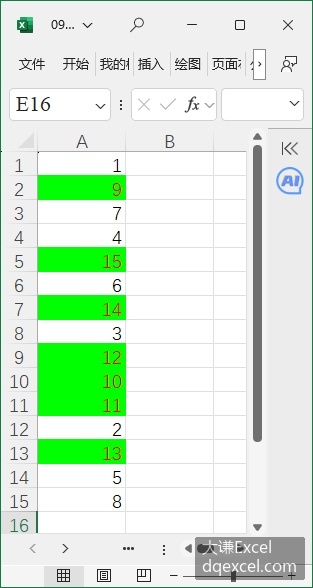
图9-14 标注平均值以上的数